


Video Downloader-HD Download
0.00.00 Reviews
App Specs
- Version
- 1.2.0
- Updated On
- License
- Free
- Downloads
- 50,000+
- Developer
- Saeta Tech Ltd.
- Categories
- Video Players & Editors
- Platform
- Android
Screenshots

 Analysis by AppCompare
I tend to judge a video-downloading app by what happens after I find something worth keeping: can I make a sensible choice about quality, locate the saved file later, and avoid wasting data or storage? Video Downloader-HD Download is aimed at that practical routine. It is a free video app from Saeta Tech Ltd., with a current version of 1.2.0 and a minimum operating-system requirement of 8.0. Its audience rating is Everyone, and it has passed 50K+ installs. The average rating currently sits at 0.0, so I would treat its reach as a sign of interest, not as proof that every workflow is dependable. My view is that it makes most sense for people who want a straightforward way to keep eligible videos on a phone, rather than a complete media-management system.
A sensible routine starts with the source
Before downloading, I first check whether the video is actually available for saving and whether I have permission to keep a copy. Platform rules and creators’ rights still matter, even when a tool makes saving feel simple. For an ordinary, permitted clip, the basic routine described for this app is to copy the video’s link, paste it into the app, choose a suitable quality or format, and start the download. That is a useful pattern when a platform does not offer a convenient offline option of its own.
I would also make a quick decision about where and when to download. If I am on mobile data, a smaller file may be the smarter choice; at home on Wi-Fi, I might prefer a sharper version for a larger screen. The trade-off is familiar but easy to overlook: higher quality can consume more storage, while a smaller file may look less pleasing when viewed full-screen. Choosing deliberately is more useful than automatically selecting the highest option every time.
Small checks that prevent everyday friction
Because this is a downloader as well as a player, I would check the finished file before relying on it for a trip or presentation. Open it while still connected, confirm that the picture and sound behave as expected, and make sure the download completed rather than leaving a partial file behind. That simple habit is especially helpful when the clip matters later and you will not have reliable internet to retry it.
Storage is another setting-like consideration, even if it is not a special feature of the app. A handful of high-quality videos can take up more room than expected, so I would periodically review what I have saved and remove clips I no longer need. If you use downloads for reference, keep a short mental distinction between temporary entertainment and files you genuinely want to retain. That reduces clutter and makes an offline collection easier to browse.
Faster habits for repeat downloads
For repeated use, I would keep the process consistent: copy one link, paste it, pick the format and quality with the intended screen in mind, then verify the file before moving on. It is tempting to queue up several clips in a rush, but checking each result as it finishes makes it easier to spot a bad source or an unsuitable quality choice while the original page is still easy to find. I would also avoid treating a download as a substitute for bookmarking the source when I may want to revisit the creator or context.
A realistic use is preparing a few permitted clips before a commute through areas with unreliable reception. I would do that while connected to Wi-Fi, choose sizes that fit the available phone storage, and play each clip once before leaving. For a classroom, work reference, or family trip, the same preparation can prevent an awkward search for signal later. It is a repeatable routine, not a promise that every site or video will be downloadable.
Worth Reading Before You Choose

EA SPORTS FC Mobile 26 Is a Bigger Football Game, but It Takes Time

Flipboard Shows What News Apps Must Do Beyond the Feed

Switching to Android Auto Means Rethinking Your Driving Routine

Google Calendar Makes a Crowded Week Easier to Manage

Ludo King Makes the Most of the Minutes Between Plans

Baby Panda World Brings Quick Play to Modern Phones, but Its Game Library Feels Busy
Where this kind of app fits—and where it does not
Compared with a platform’s own offline-viewing feature, a separate downloader may feel more flexible when you want a local file or need to handle material from more than one source. The platform’s official option is often the better choice when you mainly want to watch within that service, preserve creator context, or avoid managing files yourself. A general video player is a better fit if you already have local videos and do not need to collect new ones from online sources. This app’s appeal is specifically the bridge between finding a video and keeping a copy for later playback.
I would not choose it as my only option for a carefully organized film library, professional editing workflow, or guaranteed access to every social platform. Online services can change how their pages work, and a link-based process depends on the source being compatible and the download being permitted. If a clip is protected, unavailable, or governed by rules that prohibit copying, the practical answer is to use the service’s approved viewing method instead. That boundary is part of using any downloader responsibly, not a nuisance to work around.
What to expect from the app’s business model
The app is free to install, while optional in-app purchases range from $4.99 to $39.99 per item. I would start with the free experience and only consider paying after checking that the particular workflow I need works well for me. A listed purchase range alone does not tell me which feature or limit an item applies to, so I would read the in-app purchase details carefully before confirming anything. This is a practical point for anyone who expects a downloader to be entirely free once installed.
Its Everyone content rating makes it broadly suitable in age terms, but that does not mean every downloaded clip is appropriate for every viewer. I would still supervise what younger users save and explain that online videos may have separate creator rights and platform restrictions. The app is best treated as a utility for responsible personal viewing, not as permission to redistribute someone else’s work.
Easy Navigating and Simple Interface
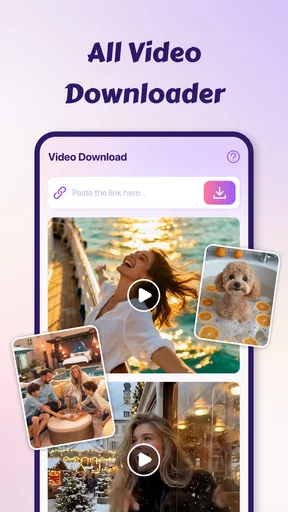
First off, navigating the Video Downloader-HD Download app is as easy as pie. The interface is super straightforward, which is a relief for those of us who don’t want to spend hours figuring out how to download a simple video. Once you open the app, you’re greeted with a clean home screen that doesn’t overwhelm you with unnecessary options. Everything is right where you expect it to be.
How It Works
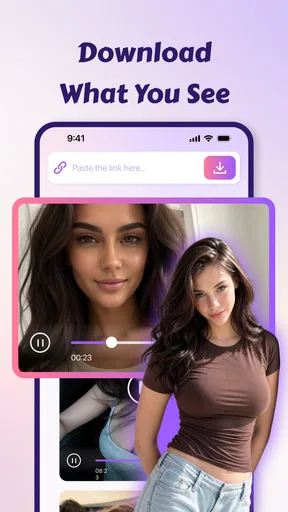
So, how does it work? It’s as simple as copying the link of the video you want to download and pasting it into the app. Hit the download button, and voilà, the video starts downloading in seconds! It supports multiple formats, so whether you want it in MP4, AVI, or any other popular format, you’ve got it. What’s even better is that you can choose the quality of the video you’re downloading. Fancy HD? No problem. Prefer a lower resolution to save space? That’s cool too.
Downloading from Various Platforms
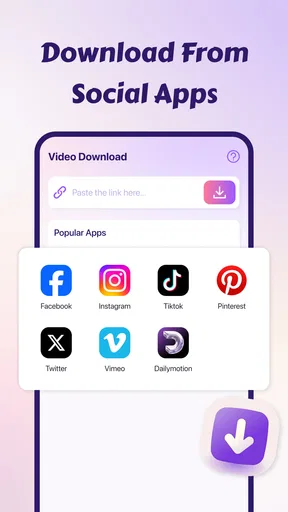
What really sets this app apart is its ability to download videos from a variety of platforms. We’re talking about the big ones like Facebook, Instagram, and Twitter, as well as several lesser-known sites. It’s like having a universal remote but for videos. No more juggling multiple apps to download from different platforms. This app does it all!
Speed and Efficiency
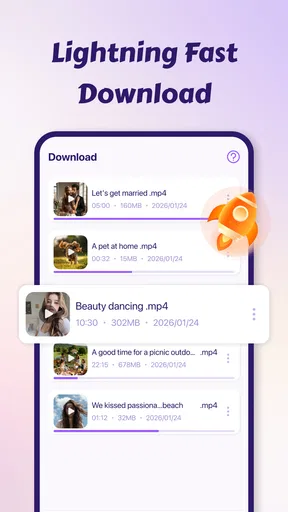
One thing that always bugs me is waiting forever for a download to complete. Thankfully, Video Downloader-HD Download ensures speedy downloads without compromising on quality. The app efficiently manages your bandwidth, which means you’re not left twiddling your thumbs as the download bar inches along. It’s quick, efficient, and gets the job done.
Offline Viewing
Once your videos are downloaded, they’re available for offline viewing anytime, anywhere. This feature is a lifesaver, especially when you’re traveling or in areas with spotty internet access. I can’t tell you how many times this feature has come in handy during long flights or road trips. It’s like having your personal entertainment library right in your pocket.
Security and Privacy
Now, I know what you’re thinking—what about security? Nobody wants an app that’s going to compromise their data. Rest assured, Video Downloader-HD Download takes privacy seriously. The app doesn’t require unnecessary permissions and ensures that your data stays safe and secure. You can download with peace of mind, knowing your information isn’t being mishandled.
Customer Support
In case you run into any hiccups, the app offers solid customer support. Whether you need help navigating the app, or troubleshooting an issue, their team is responsive and helpful. It’s always comforting to know that there’s someone you can reach out to if things go south.
All in all, Video Downloader-HD Download is a fantastic tool for anyone looking to build their own offline video collection. Its user-friendly interface, wide platform support, and robust security measures make it a standout choice in the crowded world of video downloading apps. Give it a try, and you might just wonder how you ever lived without it!
My verdict after weighing the trade-offs
I would recommend this app to someone who regularly finds permitted videos online and wants a direct route to offline playback without turning the phone into a complicated media library. The most useful approach is to think ahead about the source, the viewing device, and available storage, then check the saved file before depending on it. Those habits make the quality and format choices more meaningful than simply choosing the largest or highest option.
If you mainly watch within one service, its built-in offline tools may be simpler. If you need extensive cataloguing, editing, or a dependable route for every website, I would look for a tool designed specifically for that job. For a casual, repeatable save-and-watch-later routine, though, the straightforward link workflow is the central attraction. I would begin with a small, low-stakes download, confirm that it plays as expected, and then decide whether the app fits the way I actually use video.
Pros
- Supports multiple formats for downloads.
- Fast download speeds for large files.
- User-friendly interface
- easy navigation.
- Allows batch downloading of videos.
- No ads in the premium version.
Cons
- Limited features in free version.
- Occasional crashes on older devices.
- Requires a stable internet connection.
- Some features hidden behind paywall.
- No built-in video editing tools.
FAQs for Video Downloader-HD Download
What is Video Downloader-HD Download and how does it work?
Video Downloader-HD Download is an app designed to allow users to download high-definition videos from various online platforms directly onto their devices. After installing the app, you simply paste the video URL into the app's search bar, and it will retrieve and download the video for offline viewing. This process is straightforward and user-friendly.
Is Video Downloader-HD Download compatible with all devices and platforms?
Video Downloader-HD Download is primarily designed for Android devices, but there are versions available for iOS as well. However, compatibility may vary depending on the specific device model and operating system version. It’s always a good idea to check the app’s compatibility details in the app store before downloading.
Are there any restrictions on the types of videos I can download?
Yes, some videos may be restricted due to copyright issues or platform-specific limitations. Video Downloader-HD Download is intended for personal use only, and users are encouraged to respect copyright laws and the terms of service of the platforms they are downloading from. Always ensure you have the right to download the content.
Does Video Downloader-HD Download support batch downloading?
Yes, Video Downloader-HD Download supports batch downloading, allowing users to download multiple videos simultaneously. This feature is particularly useful for users looking to save entire playlists or collections of videos at once, thus saving time and effort compared to downloading each video individually.
Is it safe to use Video Downloader-HD Download?
Using Video Downloader-HD Download is generally safe, but it’s crucial to download the app from a reputable source, such as the official Google Play Store or Apple App Store, to avoid malware. Additionally, ensure that the app has the necessary permissions and does not require excessive access to your device’s data.


